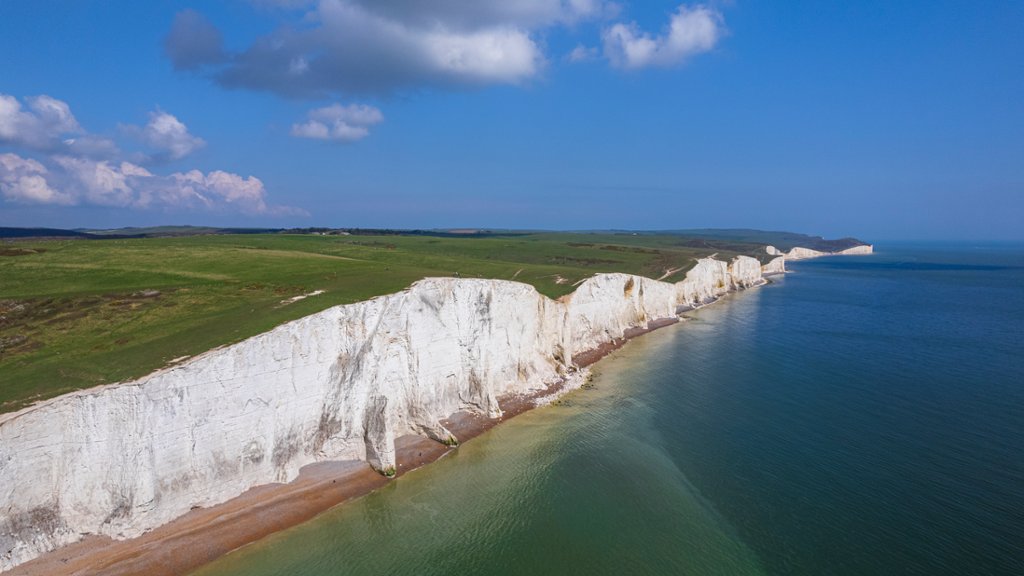
Seven Sisters, South Downs National Park, UK
Sign in to add this photo to your favorites and desktop wallpaper rotation.
The Seven Sisters are a series of chalk cliffs along the Sussex coast in South Downs National Park, located in the southeast of England. The cliffs are one of the most iconic and recognizable natural landmarks in the UK and offer breathtaking views of the English Channel. The Seven Sisters cliffs are named after the seven peaks that make up the formation, which are known as Haven Brow, Short Brow, Rough Brow, Brass Point, Flat Hill, Bailey's Hill, and Went Hill. These cliffs are a popular destination for hikers, birdwatchers, and nature enthusiasts, offering stunning coastal walks and opportunities to spot a variety of wildlife. In addition to the cliffs, the South Downs National Park is home to a diverse range of landscapes, including rolling hills, ancient woodlands, and picturesque villages. The park covers over 1,600 square kilometers and is a designated Area of Outstanding Natural Beauty, making it a popular destination for outdoor activities such as hiking, cycling, and horseback riding. Overall, the Seven Sisters and South Downs National Park offer visitors a chance to experience the natural beauty and tranquility of the English countryside, as well as the opportunity to explore a rich cultural and historical heritage.