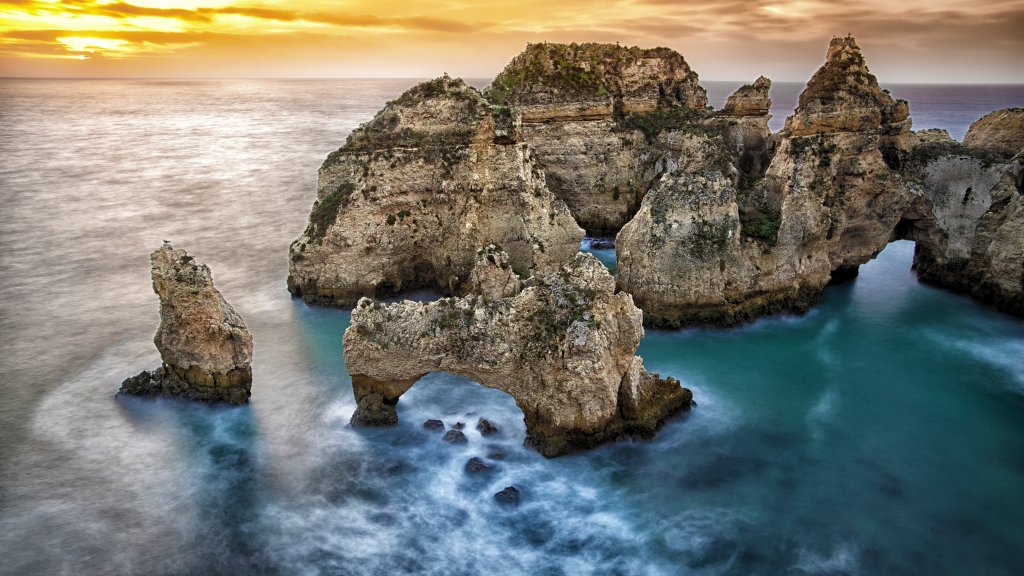
Ponta da Piedade, Algarve, Portugal
Sign in to add this photo to your favorites and desktop wallpaper rotation.
Ponta da Piedade is a stunning natural landmark located near Lagos in the Algarve region of southern Portugal. Known for its dramatic cliffs, striking rock formations, and crystal-clear waters, it is one of the most picturesque coastal areas in the country. The cliffs are made of golden limestone and have been naturally sculpted by the elements over thousands of years, creating arches, caves, and grottos that are popular with visitors. The area is accessible by land, with walking paths and staircases leading down to the water, offering breathtaking views of the Atlantic Ocean and the surrounding coastline. Many visitors choose to explore Ponta da Piedade by boat or kayak, which allows for a closer look at the intricate formations and hidden caves. Boat tours are a popular way to see the area, often departing from the nearby town of Lagos. Ponta da Piedade is also a great spot for photography, especially during sunrise and sunset when the light enhances the natural beauty of the cliffs. The area is rich in marine life, making it a popular spot for snorkeling and diving. Despite its popularity, Ponta da Piedade retains a sense of natural tranquility and is a must-visit destination for anyone traveling to the Algarve.